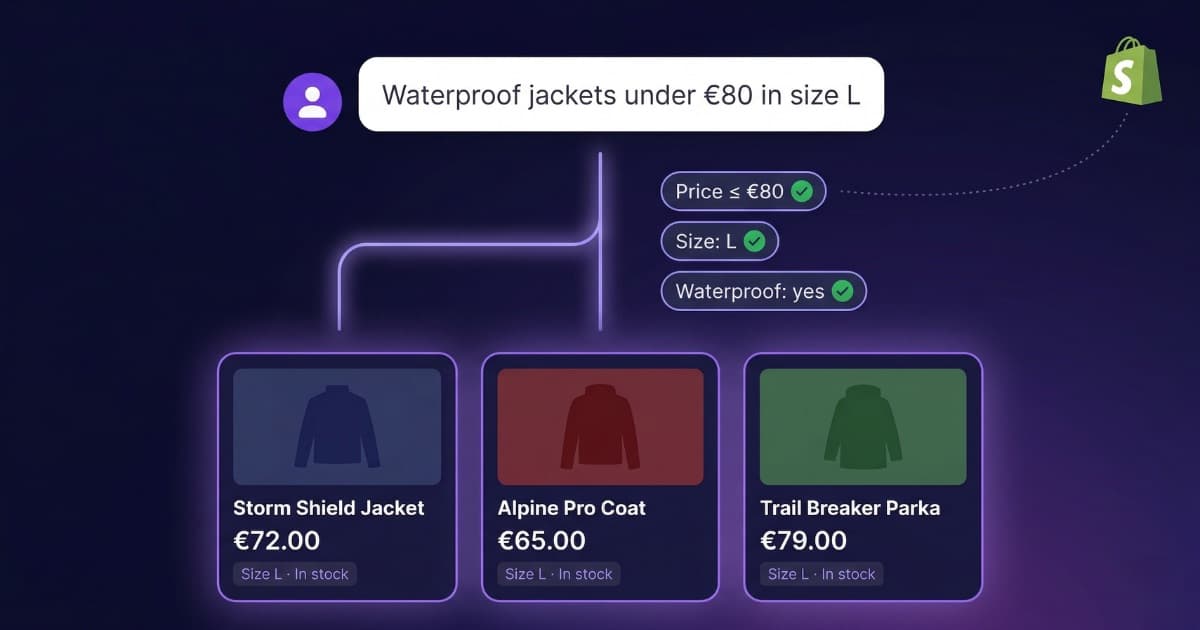
You've installed an AI chatbot on your website. You've uploaded your product catalog. A customer asks: "Do you have running shoes under $100 in size 10?" And the chatbot responds with something vaguely related — maybe shoes for $150, maybe size 8, maybe not even running shoes.
Sound familiar? You're not doing anything wrong. The problem is the technology your chatbot uses under the hood.
Most AI chatbots on the market — including those from well-known platforms like Intercom, Zendesk, Tidio, and Chatbase — use a technology called RAG (Retrieval-Augmented Generation) that works great for text documents but isn't designed to filter structured data. If you need an ecommerce chatbot with a large catalog or a real estate chatbot with price and location filters, RAG isn't enough. How that RAG works under the hood —and whether it even needs a vector database— is broken down in vectorless RAG.
In this article, we'll explain why this happens and what alternative exists. Spoiler: the solution is combining RAG with real SQL queries on your data — the best of both worlds. Almost no one does this natively — at Bravos AI we do.
How an AI Chatbot Works Under the Hood (No Jargon)
To understand the problem, you need to know — broadly speaking — how an AI chatbot searches for information when a customer asks a question.
The RAG System: Searching by Meaning
Most chatbots use RAG (Retrieval-Augmented Generation). Here's how it works:
- Chunk: When you upload a document (a webpage, PDF, or text), the system splits it into small fragments.
- Convert to numbers: Each fragment is transformed into a numerical representation (an "embedding") that captures its meaning.
- Search by similarity: When a customer asks something, the chatbot converts the question into numbers and finds fragments with the most similar meaning.
- Generate response: Using the most relevant fragments, the AI generates a natural language response.
This system is brilliant for text-based content. If a customer asks "what's your return policy?", RAG finds the fragment from your website about returns and responds perfectly. Same with business hours, services, FAQs, user guides.
If you've seen the headlines about PixelRAG (a recent RAG variant that works with screenshots instead of text), it doesn't solve this either: it isn't designed to filter structured data, and for catalogs it ends up more expensive without gaining precision.
Where RAG Fails: Data with Attributes
Now imagine you have a shoe store with 500 products. Each has a name, brand, price, available sizes, color, type (running, casual, trail), and stock. A customer asks:
"Running shoes under $100 in size 10"
To answer correctly, the chatbot needs to:
- Filter by type = "running"
- Filter by price ≤ 100
- Filter by size that includes 10
- Return only products that meet all three conditions at once
RAG can't do this. What it does is search for text fragments that "look similar" semantically to "running shoes $100 size 10". It might find a running shoe for $150 because the text is similar. Or one in size 10 but for hiking. Or it might mix information from multiple products into a response that sounds good but is incorrect.
Chatbase's own chatbot admits this when you ask if it can filter products by price:
"Approximate, not guaranteed perfect filtering."
Approximate. Not guaranteed.
The Real Problem: RAG Treats Your Catalog Like a Book
When you upload a CSV with your catalog to a platform that only uses RAG, here's what happens:
| What you see | What the chatbot sees |
|---|---|
| A table with columns: name, price, color, size | A long block of text |
| Data filterable by attributes | Loose words with approximate meaning |
| "Price: $79" as a comparable number | "Price: $79" as text that resembles other texts with numbers |
It's like giving someone a spreadsheet and asking them to find data... but by reading it aloud instead of using filters. Technically they can do it, but the result is slow, imprecise, and frequently wrong.
Does This Affect You?
Not every business needs structured filtering. If your chatbot only answers FAQs ("what are your business hours?", "do you ship to Canada?"), RAG is perfect.
But if you sell products with filterable attributes — price, size, color, location, category — or if your customers combine 3 or more criteria in a single question, a chatbot with only RAG will give you problems. An ecommerce chatbot needs to filter by price and category. A real estate chatbot needs to filter by location, bedrooms, and square footage. Training academies, car dealerships, consulting firms: any business with a structured product catalog.
How do you know if your current chatbot has this problem? Ask it these questions:
- "Show me products under [price]" — Do all results meet the filter?
- "I want [product] but not [attribute]" — Does it exclude correctly?
- Ask for something that does NOT exist — Does it say it doesn't have it, or does it make something up?
If it fails 2 out of 3, your chatbot is using RAG only. It's not a bug — it's a limitation of the technology.
What the Platforms Themselves Say
We've reviewed the official documentation from the leading chatbot platforms. Here's what they say about structured data and catalogs:
Chatbase: Doesn't accept CSV. Their own chatbot recommends converting your CSV to a text document (PDF, DOCX) and uploading that. For real filtering, they say you need to build your own API.
Intercom (Fin): Doesn't accept CSV as a knowledge source. To filter a catalog, you need to build your own REST API, your own database, and configure a Data Connector. Their documentation says it explicitly: filtering "should be handled at the API level".
Zendesk: Accepts CSV, but as text articles (one row = one article). Not as filterable data. For real filtering you need their Integration Builder (only available on the most expensive plan) + your own API.
Tidio (Lyro): Accepts CSV, but only as question/answer pairs (two columns). Not for catalogs. Product catalogs are only supported via Shopify integration, and only the standard data schema — if you use apps that modify product data, it won't work.
Crisp: Accepts CSV and sections it by product for semantic search. It's the best on this list, but it's still RAG on text — no real SQL filtering.
None of these platforms can execute a query like "products where price ≤ 100 AND category = running AND size includes 10" on your data. They all treat your catalog as text.
The Solution: Combining RAG with Real Queries
The problem isn't that RAG is bad. It's that RAG isn't enough for structured data. What you need is a hybrid system: RAG for text content (policies, FAQs, descriptions) and database queries for catalogs with filterable attributes.
Almost no platform offers this natively. Most tell you "build your own API" or "convert your CSV to PDF". At Bravos AI we do it differently:
- Upload a CSV — no converting to PDF, no building an API
- AI extracts filters automatically from the customer's question: "apartments in Miami under $500,000 with 3 bedrooms" → City = Miami, Price ≤ 500,000, Bedrooms ≥ 3
- Runs real queries on your data — exact filtering, not approximate
- Supports exclusions — "no garage", "not a penthouse"
- If there are no results, it says so — doesn't make things up or offer "something similar"
- RAG still works for what it's good at — policies, FAQs, service descriptions — but your catalog gets filtered with real queries
The difference is that filtering is exact. If an apartment costs $501,000, it doesn't show up. If it has 2 bedrooms, it doesn't show up. No "approximate, not guaranteed".
Conclusion
AI chatbots have advanced enormously, but most still use a technology (RAG) that isn't designed for tabular data. For FAQs and documentation, they work wonderfully. For an AI chatbot with a product catalog that needs to filter by attributes, they don't.
If your business depends on a catalog — whether products, properties, courses, or services — make sure the platform you choose can do real filtering on structured data. Not "approximate". Not "convert your CSV to PDF". Exact, automatic filtering, no coding required.
With Bravos AI you can upload a CSV with your catalog — or connect your Shopify, WooCommerce or PrestaShop store directly with a native integration — and the chatbot automatically filters by any attribute: price, location, category, whatever. No code, no manual setup. Try it free for 7 days and see how the filters perform on your own catalog.
Sources
- Intercom — Designing and using your APIs with Data connectors — "Filtering should be handled at the API level"
- Zendesk — Importing knowledge sources for advanced AI agents — CSV as articles, not filterable data
- Tidio — Data sources for Lyro — CSV only for Q&A pairs
- Crisp — Data sources in AI Hub — CSV as text for RAG
- Chatbase's official chatbot (February 2026)— "Approximate, not guaranteed perfect filtering", CSV "coming soon"
Chatbot can't filter your catalog?
Try Bravos AI's exact filtering on your own catalog in under 5 minutes.
Try PRO free for 7 days