97% of your website visitors leave without a trace. No form filled, no email left, no call made. They just vanish. A chatbot can intercept the ones with questions and turn them into real leads — but only if you ask for their data at the right moment, in the right way.
At Bravos, we've spent months fine-tuning exactly that: when to surface the form, what fields to include, and how to weave lead capture into the conversation without breaking it. This article distills what we've learned, backed by data and real conversation examples.
Your visitors aren't anonymous by accident
The average website conversion rate sits between 2% and 3%. But those visitors who leave aren't leaving because they're not interested. Many had questions they didn't know where to ask, or didn't want to commit to a form. Others simply didn't find what they were looking for fast enough.
The goal isn't to convert 100% — that's impossible. The goal is to give those undecided visitors a channel where they can talk without commitment. If out of those 97 visitors who leave, 5 end up talking to a chatbot and 2 leave their email, you've just multiplied your contacts.
Why people ignore your contact form
A form asks for effort in exchange for nothing immediate. The visitor has to decide what to write, hand over their data to a company they don't know, and wait for a response that might take hours or never come. The average conversion rate for contact forms is 1% according to Formstack (665,000 forms analyzed).
The root problem is reciprocity: the form asks before giving. A chatbot flips the equation: first it solves something (a question, a recommendation, a comparison) and then it asks.
We wrote a full analysis of chatbots vs forms with data from Gartner, HubSpot and Formstack. If you want to dig into the numbers, it's there. Here we focus on something else: how to ask for the visitor's data without them closing the tab.
What 90% of chatbots get wrong
If you've ever landed on a website and had the entire chat window pop open after 2 seconds with a “Hi! How can I help you?” taking up half your screen, you know what we're talking about. You didn't have any question yet. You closed it automatically. Like everyone else.
These are the most common mistakes:
Asking for data before providing any value. “Leave your email so I can help you better” is the conversational version of the contact form. The visitor sees no value in giving you their email if they don't even know if you can help.
Giving generic responses. The visitor asks “Do you ship to Hawaii?” and the bot responds “For shipping inquiries, contact our team.” If the chatbot can't answer specific questions, it's not doing its job.
Being overly enthusiastic. “Great question!! So glad you asked!” when someone asks about your hours. Artificial tone breeds distrust.
Blocking the conversation with a form. Some chatbots force you to fill in name, email and phone before letting you type. That's not a chatbot, it's a form with a bubble design.
One thing that often gets overlooked: the bot that gives generic answers isn't generic because it's bad — it's generic because it doesn't have your actual business data. Prices, stock levels, shipping policies, opening hours, service descriptions. Without that information, any chatbot (no matter how smart) ends up responding with empty phrases.
The fix is feeding the bot real content from your business: product sheets, catalogs, FAQ pages, internal docs. Platforms like Bravos let you upload documents, spreadsheets, or connect your product catalog directly — and the bot gives concrete answers because it has concrete data.
The exact moment to ask for data
The rule is simple: help first, ask later. But “help first” doesn't mean answering one question and dropping the form. It means generating enough value for the visitor to feel the conversation is worth continuing.
There are clear signals that someone is ready:
- They've asked 2 or more questions. They're engaged in the conversation. There's real interest.
- They ask about price, availability or shipping. These are buying signals. They're evaluating whether to purchase.
- They're comparing options. “What's the difference between model A and B?” — High intent.
- They ask something the bot can't answer. Perfect opportunity: “Someone from the team can help with that. Want me to connect you?”
Here's what a natural transition looks like in a real chatbot:
Shipping to Austin usually takes 2-3 business days. Orders over $40 ship free, and this one is $89.99.
Want me to leave you a quick form so the HomeGear team can reach out and help you with the order?
We'll read your conversation as context.
The bot answered two real questions with concrete data. It provided value. And when it detected buying intent (asking about shipping = evaluating whether to purchase), it offered the form as a bridge to the human team. It didn't ask for a bare email — it offered to connect the visitor with someone who can help with what they need, the way live chat for customer service hands a conversation from the bot to a person. The form appears as the logical next step, not a formality.
Now compare with this:
Done wrong: asking for data without giving anything
The visitor hasn't received anything yet. They don't know if the bot can actually help. And they're already being asked for data. They close the chat.
What to ask, how much, and who decides when
According to HubSpot, reducing a form from 4 to 3 fields increases conversion by 50%. In a chatbot the principle is the same: the less you ask for, the more people respond.
For a first touch, email is usually enough. You already have the conversation context (what product they were looking at, what they asked, what doubts they had). With that and an email you can do personalized follow-up that's worth more than a 6-field form full of generic data.
How you ask matters as much as when. And here's the key difference between basic chatbots and ones that actually work: who decides when to show the form.
Most chatbots either rely on rigid rules (“show the form after the third message”) or let the bot decide on its own. Both fail: fixed rules ignore the conversation context, and an unguided bot drops the form at awkward moments.
What works is a middle ground: you tell the bot when it's appropriate, and the bot judges the moment. For example, you can set something like “offer the form when the user asks for a quote or shows real interest in a specific product.” The bot reads the conversation and decides whether that moment has arrived. If it hasn't, it keeps helping without forcing anything.
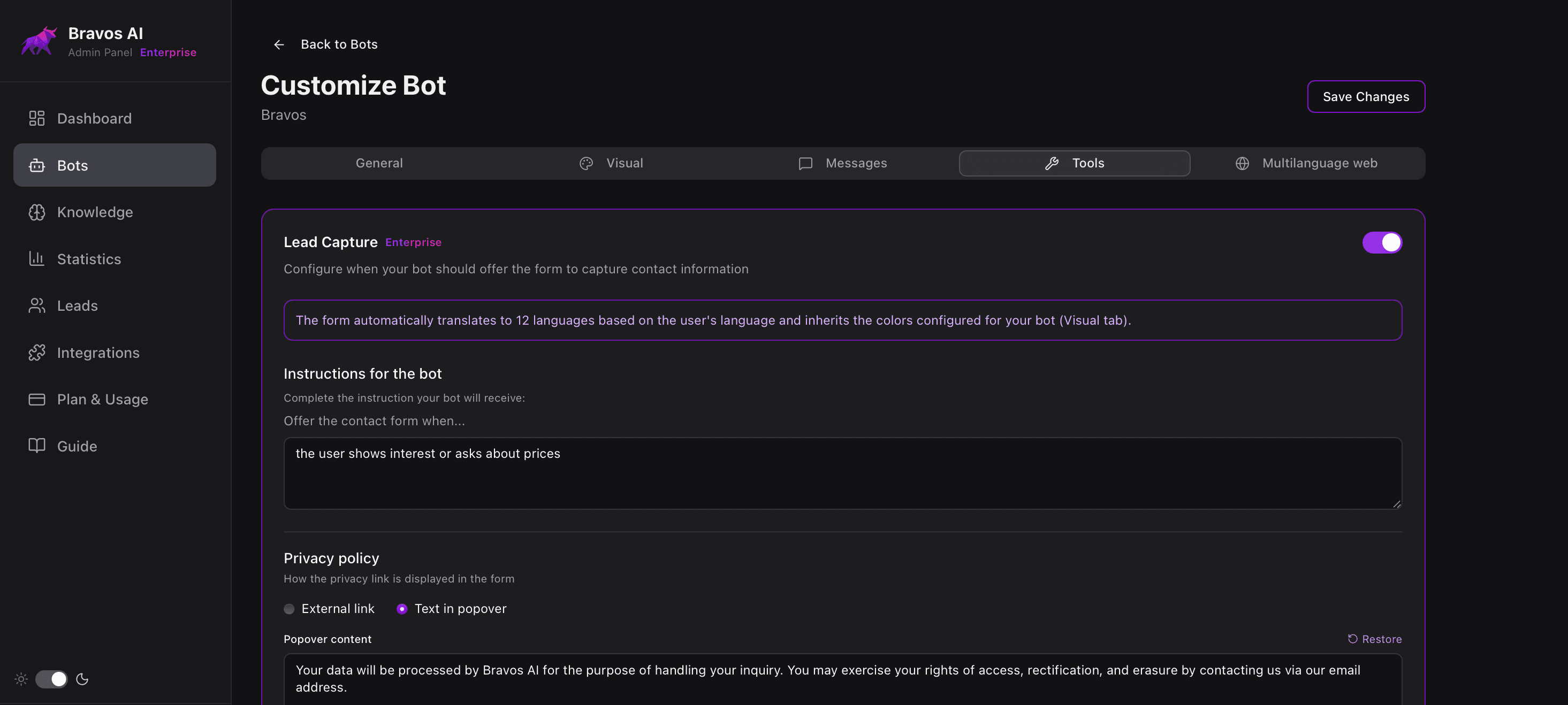
This has several advantages: the form appears when it makes sense to the visitor (not mechanically after 3 messages), the bot never asks for data in the chat itself (the form handles collection), and if the visitor doesn't fill it out, the conversation continues normally. On top of that, the system automatically controls how often the form is offered so it never feels pushy. And if you use Claude or ChatGPT, with our MCP connector you ask the assistant to fine-tune when the form is offered, and it applies our best practices to capture without scaring the visitor off, without you touching the panel.
The first 5 minutes after contact
You capture the lead perfectly. The visitor leaves their email after a productive conversation. And then... you take 3 days to respond. You've lost the sale.
The MIT study on response times is clear: contacting a lead within the first 5 minutes makes you 21 times more likely to qualify them, compared to waiting 30 minutes. Wait 10 minutes instead of 5, and the odds already drop 4x.
Harvard Business Review analyzed 2,241 companies and found that only 37% responded within the first hour. The average response time was 42 hours — nearly two days. Companies that responded within one hour were 7 times more likely to qualify the lead.
The chatbot gives you an advantage that a form doesn't: context. You don't receive a cold email saying “I'm interested in information about your services.” You receive a notification with everything the visitor discussed: what product they were interested in, what questions they asked, what doubts they had. With that you can respond like:
“Hi Maria, I'm Jake from HomeGear. I saw you were interested in the Cosori Pro II for dehydrating — it's one of the best in that price range. Shipping to Austin takes 2-3 days and it's free since it's over $40. Want me to reserve one for you?”
That's not a generic response. It's a response that shows you read the conversation, understand what they need, and you're solving their problem.
For this to work you need three things:
- Instant notification. Email or webhook that arrives the second a lead is captured. If you see it 8 hours later, the visitor already bought elsewhere.
- Conversation context. What they asked, what products they looked at, what doubts they had. If you respond without context, you lose the advantage the chatbot gave you.
- Clear expectations. Have the chatbot say something like “someone from the team will write to you in the next few hours.” So the visitor knows something will happen.
Summary: the complete sequence
- Don't interrupt. Let the visitor explore. The chatbot should be visible but not jump on them after 2 seconds.
- Answer with real data. Prices, availability, specs. If the chatbot can't answer specific questions about your business, it's not doing its job.
- Detect interest. Multiple questions, questions about price or shipping, comparisons — those are the signals.
- Ask for little. Email, at most. Framed as something useful for the visitor, not a formality.
- Respond fast. A lead is 21 times more valuable if you contact them in 5 minutes vs half an hour.
- Use the context. The chatbot already knows what the visitor wants. Use it in your response.
Frequently asked questions
When should a chatbot ask for the visitor's email?
After providing real value — never before. The best signals are: the visitor has asked 2 or more questions, they ask about price, availability or shipping (buying signals), they're comparing options, or they ask something the bot can't resolve. Never ask for data in the first message.
What data should a chatbot ask for to capture a lead?
Email only, in most cases. According to HubSpot, reducing a form from 4 to 3 fields increases conversion by 50%. Phone fields can reduce conversion by up to 5% because people fear sales calls. You already have the conversation context — with an email and that context, you can do effective personalized follow-up.
How fast should I respond after a chatbot captures a lead?
Within 5 minutes, ideally. The MIT Lead Response Study found that contacting a lead within 5 minutes makes you 21 times more likely to qualify them compared to waiting 30 minutes. Harvard Business Review found that only 37% of companies respond within the first hour, and the average response time is 42 hours.
How does the chatbot know when to show the form?
It depends on the platform. Basic ones use fixed rules (after X messages). The better ones let you give the bot instructions about when it's appropriate (e.g., “when they ask for a quote or show real interest in a product”) and the bot reads the conversation to judge whether that moment has arrived. That way the form appears when it makes sense, not mechanically.
Sources
- MIT Lead Response Management Study — 15,000 leads, 100,000 calls: responding in 5 min = 21x more likely to qualify
- Harvard Business Review — The Short Life of Online Sales Leads — 2,241 companies: only 37% respond within the first hour
- HubSpot — Form Fields & Conversion Rates — 40,000 forms analyzed
- Formstack — Form Conversion Report — 665,000 forms: contact forms convert at 1%
- HubSpot — Customer Service Statistics — 90% expect immediate response
Want to capture leads while you sleep?
Create your chatbot for free. Lead capture built into the conversation.
Try PRO free for 7 days