A chatbot is exactly as good as the data sitting behind it. If prices changed last week, if a SKU went out of stock yesterday, if a product was discontinued three days ago — that update has to reach the bot without anyone having to remember it. If it doesn't, the bot keeps promising things that no longer exist.
Most chatbot platforms solve this halfway: they let you upload a file or paste a URL and, for everything else, they push you to wire up the plumbing yourself with Zapier, n8n or Make. The typical result is a chatbot advertised at $30/month that ends up costing a lot more once you add the middleware subscription, the extra task tiers and the maintenance.
This article takes that apart. There are many possible ways to keep a chatbot's data current without Zapier or n8n, and what separates one vendor from the next is how many they ship inside the product and how many they push you to bolt on from outside. At Bravos AI we've built four of them running in production so far — the ones that cover the vast majority of practical use cases — and we walk through exactly how they work so you can compare them with whatever platform you're evaluating.
The real cost calculation nobody runs before picking a chatbot
Picture a store with 500 products. Prices rotate with weekly promotions, stock moves daily, a few SKUs get retired every month. For a chatbot to answer with current data, you need to sync that catalog at least twice a day.
If your chatbot platform doesn't ship native sync, the usual workaround is to wire the connection outside with an automation tool like Zapier or n8n. They're external platforms that trigger a workflow every time something changes in one tool and replicate it in another: they spot a new row in a spreadsheet, push that data to your chatbot, and wait for the next change. Sounds neat on paper. The problem shows up on the invoice. And that's the calculation almost nobody runs when comparing chatbot prices.
Let's run the numbers on Zapier, the most widely used option. Its free plan allows 100 tasks per month, two-step Zaps max (zapier.com/pricing); a task is each individual action a Zap executes. Syncing 500 products twice a day means 1,000 tasks per month just to move the catalog — before counting leads, errors or retries. You're kicked out of the free plan by day two of the month.
The next step is Zapier's Professional plan, which starts at $30/month (or $19.99 billed annually) for 750 tasks. Need more? Professional scales internally with a task-tier selector: more tasks, higher monthly cost. In other words, the 1,000 tasks from our example already push you past the entry tier. A chatbot advertised at $30/month ends up with a combined bill that nobody includes in their public price comparison, because the math depends on your volume of changes and the exact tier each company picks.
The right question before picking a platform isn't how much does the chatbot plan cost, it's how much does it cost to actually keep it current. What lives inside the product is paid for. What needs Zapier in between is paid for too.
Why a chatbot with stale data is worse than no chatbot
A chatbot without fresh data doesn't stay neutral — it starts doing damage. One customer asks about a product that's no longer sold and the bot eagerly recommends it at an expired price. Another asks if a specific size is in stock and the bot confirms it is, when in reality it sold out a week ago. A third looks for a color the bot still offers, even though it's been two months since the supplier last shipped it.
These aren't hypotheticals. Air Canada lost a 2024 lawsuit because its chatbot promised a bereavement-travel discount that wasn't valid; the court ruled that the airline was liable for what its own chatbot said, not the customer who believed it. We cover this in detail in chatbot legal liability.
The uncomfortable part is that most companies don't find out. The customer doesn't write to complain — they just don't come back. The company thinks it has a working automated tool and meanwhile the bot has been recommending a discontinued product for three months. That's why sync isn't a technical detail, it's a decision that hits the P&L directly.
There are three reasons a chatbot serves old information. First: the knowledge base was loaded once as a static file and nobody touched it again. Second: sync existed but quietly broke — the classic Zapier chain that dies without notifying anyone. Third: the bot answers from its trained model instead of querying the live data at answer time. All three are solvable, and all three depend on the plumbing the platform ships. We unpack this in why your chatbot makes up answers.
The 5 native paths we ship today at Bravos AI
There's no one-size-fits-all here. Every vendor decides what they solve inside the product and what they leave to you; most fall short and push the customer toward Zapier or n8n the moment data changes with any frequency. These are the five paths we've built into Bravos AI so that external plumbing isn't needed, with their real-world usage notes. Which one fits depends on where your data lives today.
Path 1 — Google Sheets or Excel
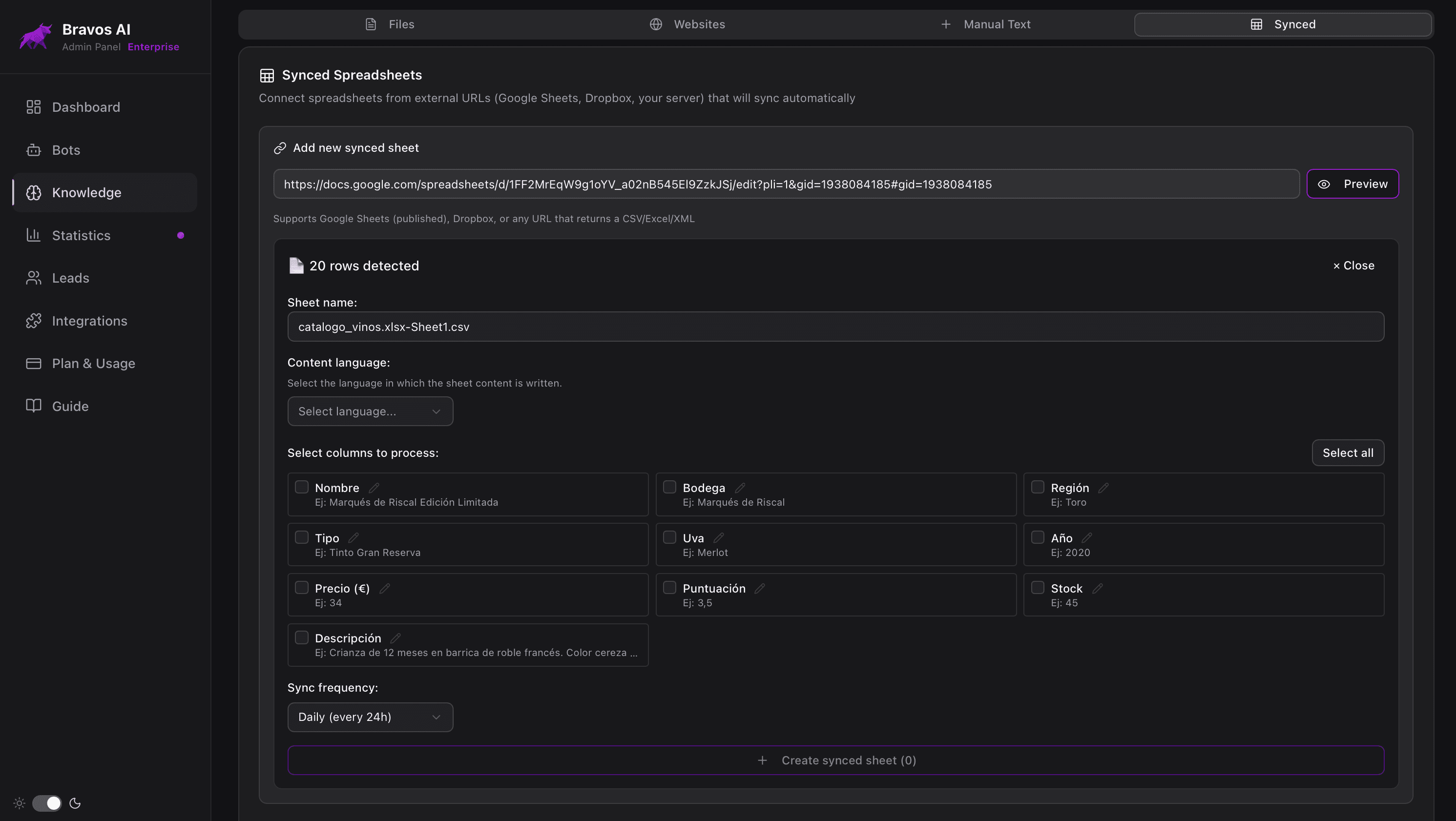
The most universal path. Every company has a spreadsheet with something in it: product catalog, prices, service rates, branch-by-branch listings, basic inventory, B2B contact list. Connecting that spreadsheet to the chatbot solves the majority of practical use cases without writing a line of code.
How it works at Bravos AI: you paste the public URL of the sheet into the dashboard, choose how often you want the bot to check for changes (daily or weekly), and the system handles the rest. Edit a cell today and the bot reflects it at the next sync. Don't touch anything and nothing happens — the bot stays as it was.
Where it fits: a dental clinic with three locations and different price lists, a restaurant with seasonal pricing, a training academy with a course catalog, a small store with fewer than 200 SKUs, any business whose product or service catalog changes regularly. Maintenance boils down to editing a cell; the bot finds out the next day without anyone having to ping it.
Where it doesn't fit: catalogs with thousands of SKUs that change daily (use your e-commerce platform's native integration if one exists), data that must be live in real time (use a webhook), or sensitive information that shouldn't live in a shared spreadsheet.
Path 2 — Shopify (real-time sync)
If your store runs on Shopify, you don't need spreadsheets or files: the store itself is the source of truth, and the native integration brings it across. Bravos AI loads your entire catalog upfront (products, variants, prices, stock, descriptions) and from then on, Shopify notifies us every time something changes. In seconds, the bot knows about the change.
The difference compared to periodic sync matters for stores with a moving catalog. A product that goes on sale at 9:00 is reflected in the chatbot at 9:00, not the next day. If a variant runs out of stock, the bot stops recommending it that same morning. This matters especially for Black Friday campaigns, limited drops and flash promotions, where a 24-hour delay equals a missed offer.
The integration also covers the small details most platforms skip: translated product fields when the store uses Shopify Markets, optional attributes, automatic grouping by option (size, color, material) so the bot understands variants instead of treating them as separate products. Full breakdown in Shopify AI chatbot guide.
Path 3 — PrestaShop
For stores built on PrestaShop the mechanics are similar but the cadence is different: full initial catalog load and, from then on, a daily check that updates only what changed since the last run. No manual upkeep.
Why it's not real-time like Shopify: PrestaShop doesn't emit webhooks as a standard, so the integration runs in pull mode (Bravos asks every night) rather than push (PrestaShop notifying instantly). In practice, daily cadence usually suffices for PrestaShop stores because catalog rotation tends to be less aggressive than on Shopify.
The integration covers products, categories, variants, prices, descriptions and translated URLs for multi-language stores. No theme code changes, no marketplace modules to install, no Zapier in the middle. Full breakdown in PrestaShop AI chatbot guide.
Path 4 — WooCommerce (real time + nightly check)
If your store runs on WooCommerce, the mechanics combine the best of the two above: a full initial catalog load (products, variations with their own price and stock, descriptions already cleaned of the leftover codes page builders like Elementor leave behind) and, from then on, your store notifies us whenever something changes and the bot reflects it within seconds.
With a safety net that isn't optional in WordPress: WooCommerce notifications depend on an internal mechanism that can fail on low-traffic stores, so the full catalog is checked against the store every night in case any notification got lost. Changes arrive instantly when your store sends them, and the nightly check guarantees nothing stays behind for more than a day. If the API key you generate is read-only, the integration runs in nightly-only mode and the dashboard tells you so.
The integration understands WooCommerce's quirks: the three ways it expresses stock (exact quantities, in stock / out of stock, inherited from the parent product), sales quoted with the before-and-after price, prices with or without tax depending on how your store displays them, and multilingual stores running WPML or Polylang. Full breakdown in our WooCommerce chatbot guide.
Path 5 — Custom webhook (when your data lives somewhere else)
The fifth path is for anything that isn't a spreadsheet or a Shopify, WooCommerce or PrestaShop store. Data living in a homegrown ERP, a corporate PIM, a custom database, an industry-specific tool of record. Plugging directly into the source isn't an option because every source is different. The right pattern is the source pushing changes to a generic endpoint whenever they happen.
That's exactly what Bravos AI's custom webhook does. Your system pushes changes in JSON or XML to a unique signed URL of your bot, and the bot processes them instantly. The initial bulk load handles up to 50 MB. Each subsequent call can carry an insert, an update or a delete. And the data doesn't have to be flat: if your object has sub-lists (say, a real estate listing with several photos, or a service with several pricing tiers), the bot also knows how to use them in its answers.
Real use cases are the ones that don't fit any standard template. A real estate firm that doesn't use Resales Online and has its own database. A travel agency with an internal fare engine. A manufacturer with a white-label PIM. A professional services company with a bespoke CRM. They all share one trait: nobody's going to build a dedicated connector for them, so they need a generic, well-documented path.
Full reference, with payload examples, HMAC signatures, accepted formats and limits, lives on the developer documentation page. For companies without internal technical staff, the person maintaining the ERP or an external vendor usually handles the connection — once it's wired up, it runs for years untouched.
The external plumbing trap: Zapier, n8n and friends
Zapier and n8n are excellent tools for plenty of things. The problem isn't the tools — it's using them for something the chatbot platform should handle internally. When the sync between your data and your bot routes through an external service, three things happen that are worth seeing in numbers.
The cost compounds
With our 500-product store syncing twice a day, that's 1,000 tasks per month just for the catalog. Add a flow that pushes leads captured by the bot into your CRM and you're another 500-1,000 tasks deep. Errors and retries count too.
Zapier's Free plan is out (100 tasks/month). Professional starts at $30/month (or $19.99 billed annually) for 750 tasks and scales internally: more tasks, higher monthly cost. The chatbot advertised at $30/month stops being $30/month and grows with your change volume.
n8n isn't hugely different. The n8n Cloud Starter plan is €20/month (around $24) for 2,500 executions, and Pro is €50/month (around $54) for 10,000, per their official pricing page. An execution covers multiple steps, so the per-unit cost is lower than Zapier, but the underlying logic is the same: you're paying every time something moves between your data and your bot.
And it's slow to notice
Another number rarely scrutinized on the pricing page changes the whole story: polling cadence. On Zapier, the Free plan checks sources every 15 minutes. The Professional plan drops to 2 minutes, Team or Enterprise to 1 minute. In other words, on Zapier Free, a change you make in your sheet at 10:00 can take until 10:15 to reach the chatbot, even though the technical task itself takes half a second.
Compared to the native Shopify integration at Bravos AI, where the store itself notifies us when something changes and the bot updates in seconds, those are two different worlds. The gap matters especially when we're talking about stock, flash offers and limited-time promotions: a 15-minute delay can be the difference between recommending an available product and recommending one that just sold out.
The chain breaks silently
Zapier disables Zaps that repeatedly fail and emails you about it, but that email lands in an inbox nobody monitors. n8n behaves similarly: the workflow stalls and the notification depends on whether the error monitor was configured, which most of the time it wasn't. One of the most common stories we hear from companies switching to Bravos AI after some time on another platform: the chatbot had been quoting old prices for months and nobody noticed because the middleware had quietly died.
Maintenance accumulates
Every change to the source format means going back to the automation. Add a new column to your spreadsheet — you have to reconfigure the flow. Shopify tweaks a field format — same drill. It's maintenance debt that builds up over time, never appears in the initial estimate, and tends to land with whoever is least prepared to handle it.
The self-hosted n8n case
n8n has one variant Zapier and Make don't: a free, self-hosted Community Edition under the FairCode license. For technical teams it can look attractive because the per-execution cost disappears. What doesn't disappear is the real cost: a server to maintain ($5-20/month depending on capacity), updates to apply when they're released, backups, monitoring, security patches and someone to take care of all that. If the company doesn't have that someone, the initial saving translates into technical debt.
When external plumbing does make sense
Two honest cases. One, when the source is so unusual or so rarely used that no platform will give it native support, and there's no headroom for a custom webhook integration. Two, when changes happen very infrequently (once a month or less) and the per-task cost stays inside the free tier. For everything else, having sync inside the product is cheaper, more reliable and more maintainable.
Zapier and n8n prices cited here are publicly available on their official sites. Real numbers depend on each company's actual change volume, so it's worth running the math with your real catalog and frequency before picking a platform.
How to pick: a four-question decision tree
If, after the five paths above, you still aren't sure which one is yours, work through these four questions in order. The answer to the last one points you to the path.
- Do you run an online store on Shopify, WooCommerce or PrestaShop? If yes, the native integration covers your case. If no, keep going.
- Does your data live in a spreadsheet today (Google Sheets, Excel) or could it reasonably fit in one? If yes, Sheets sync. If no, keep going.
- Do you have someone on your team, your agency or an external vendor who can configure a signed webhook (a developer, a sysadmin, someone who maintains your ERP)? If yes, custom webhook. If no, keep going.
- Are you willing to add Zapier, n8n or a similar tool in the middle, with its subscription cost or server-and-maintenance cost? If yes, that's your path. If no, the sensible move is to prepare a spreadsheet with your essential data and start with Sheets sync.
The fourth question is the one most often skipped. A well-organized spreadsheet with the 100-200 most critical data points of your business (top products, prices, variants, references and availability) typically covers 80% of real customer queries. You don't need to dump your entire ERP to start getting value.
Comparison: Bravos AI vs. Tidio, Crisp and Intercom
All four platforms exist and all four advertise AI chatbots. What changes is how much each one ships natively to keep data current, and starting on which plan. Comparison built from each vendor's public documentation, verified in May 2026.
| Mechanism | Bravos AI | Tidio | Crisp | Intercom |
|---|---|---|---|---|
| Native Google Sheets / Excel sync | Yes, from Starter (€19/month) | Via Zapier | Via Zapier | Via external tool |
| Shopify integration (official app) | Yes, real-time catalog sync | Yes, native actions from Growth plan ($59/month) | Yes, official app on Shopify App Store | Yes, from Essential plan ($39/seat/month) |
| PrestaShop catalog sync to chatbot | Yes, incremental daily sync | Chat widget plugin only | Chat widget plugin only | Chat widget plugin only |
| Documented inbound webhook for arbitrary data | Yes, HMAC-SHA256 + JSON/XML | Not documented | Not documented | Not documented |
| Re-sync that preserves bot customizations | Yes | No (re-sync wipes attached Q&A) | N/A | Yes (Fin resyncs every 24h) |
| Lowest plan with automatic bot sync | €19/month | Plus ($749/month) for URL auto-sync | Not documented publicly | Essential $39/seat + Fin from $0.99/resolution |
A few caveats that don't fit in the table and are worth knowing.
Tidio Lyro: re-syncing wipes your manual Q&A. Their own documentation confirms it: when you re-sync a data source, the attached question-and-answer pairs are deleted and replaced with the new ones. If your team spent time correcting specific bot answers, those corrections vanish every time you re-sync.
All three vendors have PrestaShop modules, but only for the chat widget. Tidio, Crisp and Intercom all have modules in the PrestaShop Addons Marketplace, but per public documentation they exist to install the chat widget on the store; we didn't find automatic catalog sync from PrestaShop into the chatbot in any of them. At Bravos AI, catalog sync is the whole point of the integration: the bot knows products, prices, stock and variants.
Intercom Fin syncs external sources, but not Google Sheets. Fin accepts Confluence, Notion and Guru as external content sources with a 24-hour resync. To get a spreadsheet into its knowledge base, you have to route it through a third-party tool.
Prices change, so double-check each vendor's pricing page before deciding. Verification links at the end of the article. The comparison focuses on data sync; each platform has strengths in other dimensions (unified inbox, surveys, marketing) that fall outside the scope of this piece.
In short
A chatbot is only as good as its data. The difference between platforms isn't the price of the plan or how slick the dashboard looks — it's how many sync paths they ship inside and how many they push you to wire outside. And when you wire it outside with Zapier, n8n or anything similar, that middleware has three known problems: a cost that scales with volume, delays of up to a quarter of an hour before changes reach the bot, and silent failures that leave your chatbot quoting old prices for months without anyone noticing.
At Bravos AI we've built five native paths so far that cover the vast majority of practical use cases: Google Sheets / Excel sync, real-time Shopify integration, real-time WooCommerce integration with a nightly check, daily-sync PrestaShop integration, and a fully documented custom webhook for anything that doesn't fit the above. All five ship from the Starter plan at $20/month, with no tasks to count and no chains breaking in silence.
There is one more way to keep it current, this one from the other side. If you work with Claude or ChatGPT, with our MCP connector you ask the assistant itself to go through the loaded content, spot what has fallen out of date and fix it in the same conversation. It doesn't sync an external source like the five above: it helps you audit and repair what the bot already has, without opening the panel.
The suggestion is the same one that opens the article: before comparing chatbot prices, open a spreadsheet and add up what it actually costs to keep the bot current. That's the cost that matters.
Frequently asked questions
How often should I update my chatbot's knowledge base?
It depends on the type of information. Catalog data (prices, stock, availability, references) changes daily and is what needs automatic sync — daily or real-time. The rest of the bot's content (service descriptions, informational text, hand-edited FAQs) is updated by a person when something changes, no automatic sync involved. The rule of thumb we use at Bravos AI: if a customer could make a buying decision based on a piece of data, that data shouldn't be more than 24 hours old.
Can I connect my chatbot to Google Sheets without Zapier?
Yes, if the chatbot platform supports it natively. At Bravos AI you connect a Google Sheet or Excel file directly from the dashboard: paste the public URL, pick the sync frequency (daily or weekly), and the bot updates itself whenever you change something in the sheet. No middleware, no per-task billing, no broken chain when Zapier goes down. And if you use Claude or ChatGPT, you can even review and update the bot's content straight from the chat with an MCP.
Why does my chatbot quote outdated prices even after I changed the catalog?
Usually three reasons. One, you uploaded the catalog as a static file (PDF, manual CSV) and there's no sync. Two, sync exists but is silently broken — the classic Zapier or n8n chain that dies without notifying anyone. Three, the chatbot reads from the trained model instead of querying the live data at answer time. We unpack this in why your chatbot makes up answers.
How much does it really cost to keep a chatbot updated with Zapier or n8n?
Zapier Free caps at 100 tasks/month, two steps max per Zap. Professional starts at $30/month (or $19.99 billed annually) for 750 tasks and scales internally: passing the 750-task ceiling forces you up a tier within Professional, with the matching monthly cost. n8n Cloud Starter is €20/month (about $24) for 2,500 executions; Pro is €50/month (about $54) for 10,000. Self-hosted Community is free under FairCode, but adds server and maintenance cost. In every case, it's an invoice separate from your chatbot, and worth pricing out before picking a platform.
What if my data isn't in Sheets or in Shopify, WooCommerce or PrestaShop?
That's what the custom webhook is for. Your system (ERP, PIM, in-house database, custom tool) pushes changes to a unique URL of your bot in Bravos AI, signed with HMAC-SHA256 and in JSON or XML. It supports inserts, updates, deletes, multiple datasets per bot and objects with sub-lists (for example, photos of a real estate listing or pricing modalities of a service). The initial bulk load handles up to 50 MB. Full reference on the developer documentation page.
Verification and sources
Data and quotes verified in May 2026. Pricing pages and vendor documentation change frequently: check the official sources before making decisions.
- Zapier — Plans and tasks per tier: zapier.com/pricing.
- n8n — Cloud pricing and Community self-hosted notes: n8n.io/pricing.
- Tidio Lyro — Data source documentation: help.tidio.com.
- Crisp — Pricing and AI credits: crisp.chat/en/pricing.
- Intercom Fin — External source sync: intercom.com/help.
- Bravos AI — Developer documentation (custom webhook): bravos-ai.com/developers.
All 5 paths, inside the product, from €19/month
Synced spreadsheet, real-time Shopify, real-time WooCommerce, native PrestaShop and custom webhook — all five ship with Bravos AI's Starter plan. No Zapier or n8n in between, no tasks to count, no chains breaking in silence. Try it with 7 days free on the full PRO plan.
Try PRO free for 7 days