When an AI paper comes out with eye-catching numbers, one of two things usually happens: either nobody reads it, or everyone makes up what it says. PixelRAG falls into the second group. The viral threads claim it “kills text-based RAG”, that it improves accuracy by 18% with half the tokens, that there's no longer any point in training text embeddings.
We read the full paper, downloaded the code and calculated real costs using current market pricing. What follows is the honest explanation for someone evaluating whether PixelRAG actually fits their business chatbot: what it is, how it works under the hood, what the real numbers say (not the headlines), what it costs in production and when it genuinely helps. With direct quotes from the paper itself.
What PixelRAG actually is
PixelRAG is a RAG (Retrieval-Augmented Generation, the technique most AI chatbots use to answer with your information instead of making things up) system published in June 2026 by researchers from UC Berkeley, Princeton, EPFL, Databricks and Renmin University. The difference with traditional RAG isn't in the language model. It's in how the information is prepared and retrieved.
Traditional RAG — the kind 99% of chatbot platforms use, Bravos AI included — works like this: it takes your documents (a PDF, a website, a catalog), chunks them into text fragments, converts them into numerical vectors called embeddings and stores them in a vector database. When a customer asks something, the system finds the fragments most similar to their question and passes them to the language model. Works well for text: FAQs, descriptions, policies, manuals. Whether that vector database is even necessary is exactly the vectorless RAG debate.
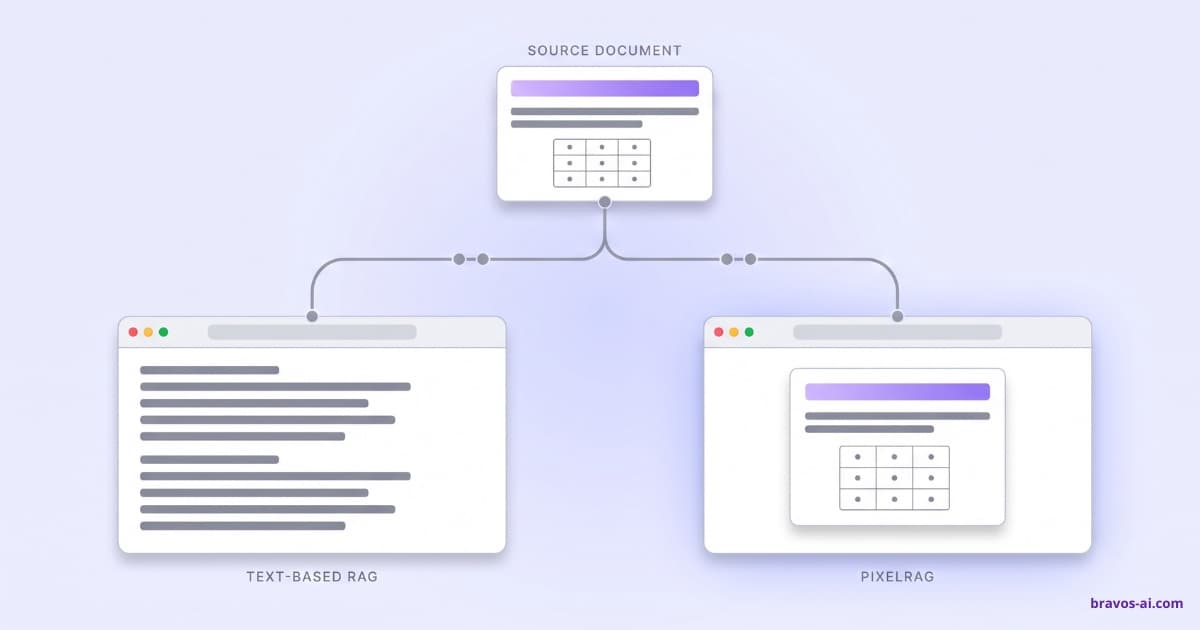
PixelRAG changes the first step. Instead of extracting text from your documents, it renders each page as an image (a screenshot, literally) and stores that image. When a customer asks, the system finds the most relevant images and passes them (not text) to a multimodal language model — one that can read images, like GPT-4o or Qwen3-VL — which reads them the way a human would and answers.
Why do this? Because text, when extracted from a laid-out PDF, loses a ton of information: tables get broken, charts disappear, layouts stop making sense. A financial PDF with a ratios table becomes a list of disconnected numbers without context. An infographic stops existing entirely. PixelRAG preserves all of that because it treats each page as an image.
How it works under the hood
The end-to-end flow, per sections 3.1 and 3.2 of the paper:
- Render. Every page of every document is rendered as an image with a headless browser (Chromium via Playwright). For all of Wikipedia (7 million articles) this takes about 2 days on infrastructure with 128 cores, 2 TB of RAM and 8 H100 GPUs.
- Tiling. Each image is split into tiles of 875 pixels wide by 1024 tall, with no overlap.
- Embedding. Each tile is turned into a 2048-dimensional vector using Qwen3-VL-Embedding-2B, a 2-billion-parameter vision-language model with a custom fine-tune on screenshot data.
- Indexing. Vectors are stored in a FAISS IVF index. For the 30M tiles covering all of Wikipedia, the index takes ~120 GB and the images on disk take 5.6 TB.
- Search. When a question comes in, it's embedded with the same model and the closest tiles are retrieved (top-3 by default in the paper).
- Reading. The selected tiles (images) are passed to a final multimodal model — the paper defaults to Qwen3-VL-4B — which “reads” the images and generates the answer.
It's a coherent architecture. It solves a real problem: text-based RAG loses visual structure. And it solves it at scale (30M tiles for Wikipedia) without falling into ColPali-style multivector, which would be prohibitively expensive at that size.
The question isn't whether the architecture is good. It's whether the problem it solves is your problem.
PixelRAG vs traditional RAG: what changes
The most intuitive difference: faced with a Wikipedia page with a table, this is what each system “sees” before passing it to the language model:
Boston capital Massachusetts population.
675 647 inhabitants city proper.
4 941 632 metro area.
Density 13 938 per sq mi.
Coordinates 42°21'N 71°03'W.
(the table got broken into disconnected sentences)
Boston
| State | Massachusetts |
| Population | 675K |
| Metro | 4.9M |
| Density | 13,938/mi² |
(the table is preserved as an image, the multimodal model reads it like a person would)
That's the promise. When the content is plain text — your dental clinic's FAQ, your store's return policies, your service descriptions — there's no difference. Text-based RAG extracts the text perfectly. PixelRAG's promise is for content where layout carries information: tables, infographics, spec sheets, manuals with diagrams.
This table summarizes the real technical differences (not the marketing ones):
| Dimension | Text-based RAG | PixelRAG |
|---|---|---|
| Storage | Plain text + vectors. A few GB for Wikipedia. | 5.6 TB of images + 120 GB of index for Wikipedia. |
| Indexing | Minutes on CPU for mid-size corpora. | ~2 days on 8× H100 for Wikipedia. |
| Tokens per query | ~1,700 (text). | ~2,625 visual (3 tiles × 875). |
| Latency | Sub-second for retrieval. | Not reported in the paper. Processing images in the LLM is slower. |
| Languages | Multilingual (100+ with OpenAI embeddings). | English only. No proven transfer to other languages. |
| Shines at | Plain text, FAQs, descriptions, policies. | Tables, infoboxes, visual layouts. |
| Fails at | Laid-out PDFs with complex tables/charts. | Lists, unstructured content, navigation across pages via links. |
The real results (the +18% that isn't +18%)
The viral headline is “PixelRAG improves accuracy 18% over text-based RAG”. That number does appear in the paper's abstract. But it's the improvement on the best benchmark, not the average. When you break down the 6 actual benchmarks the paper reports, the picture changes:
Real PixelRAG improvement over the best text baseline
The peak of +15.5 percentage points is on EVQA (Encyclopedic Visual Question Answering), a benchmark of questions about Wikipedia infographics and visual elements. Exactly where you'd expect an image-based system to shine. On typical text questions (Natural Questions), the improvement is under 3 points. On tables (NQ-Tables) it's 6.3 points — decent, not spectacular.
And there's something else the headline hides. The paper breaks down what type of evidence PixelRAG retrieves better in SimpleQA (section 5.2, table 2):
- Tables: +9.1 points (where it really shines).
- Bordered infoboxes: +4.6 points.
- Paragraphs: +7.9 points (surprisingly high; the authors attribute it to infoboxes “displacing” relevant paragraphs from the top-3 in text-based RAG).
- Lists: +0.5 points (essentially no gain, within error margin).
And the most important detail of all for this discussion: all 6 benchmarks are on Wikipedia and news articles (CNN, BBC, AP). None of them touch product catalogs, corporate FAQs, software manuals, service descriptions, legal policies or anything resembling what a real business chatbot handles. The paper's own section 5.1 says so.
The second metric going around is “10× fewer tokens”. That number is real, but also misleading out of context. It appears in section 5.4 and refers to use in agents of the ReAct kind: a model that does multiple searches and reasons in a loop, with up to 20 steps per question. In a typical business chatbot — question, single search, answer — that reduction doesn't apply. What applies is the comparison of tokens per single query, and there PixelRAG consumes more tokens (visual ones) than text-based RAG.
What it actually costs
The paper does not publish end-to-end monetary costs. We calculated the real costs for a typical business chatbot (10,000 messages per month) using current official pricing:
| Configuration | Cost per query | 10,000 messages/month | Notes |
|---|---|---|---|
| Standard text-based RAG (embedding-3-small + GPT-4.1-mini) | ~$0.00092 | ~$9.20 | What 99% of SaaS platforms use today. |
| PixelRAG with self-hosted Qwen3-VL-4B | ~$0.00015 API only | ~$1.50 + GPU | Requires maintaining a dedicated GPU ($200-500/mo extra). |
| PixelRAG with GPT-4o as reader (or an equivalent commercial multimodal model) | ~$0.0066 | ~$66 | 7× more expensive than standard text-based RAG. |
And that's just inference cost per query. Initial indexing also adds up. For a small 1,000-page corpus, PixelRAG needs ~$0.55 in GPU time to process the images. Text-based RAG with OpenAI embeddings processes the same for ~$0.20. Not the biggest gap, but it compounds if you reindex often.
Then there's storage. The 5.6 TB Wikipedia images take vs the few GB the same content takes as text. In cloud, that's ~$110/month just in standard S3 (at $0.023/GB). For a mid-sized enterprise corpus (50,000 pages of internal docs) the numbers are more reasonable, but always 100× to 1,000× larger than the equivalent text-based RAG.
The limitations the authors themselves acknowledge
Appendix E of the paper, titled “Limitations”, is one of the more honest pages we've read recently in an AI paper. The authors list five serious limitations without sugar-coating them. Three directly impact any business chatbot:
1. English only
“all datastores in this work are English-only [...] introducing a language bias”
— PixelRAG paper, Appendix E
The embedding fine-tune was trained on English-only Wikipedia screenshots. There is no evidence the system works well in Spanish, French, German or any non-English language. For a business chatbot operating in non-English markets, this is a short-term deal-breaker.
2. Loses hyperlinks
“hyperlinks are visually rendered (e.g., as blue underlined text) but are not directly actionable; the system cannot follow a link to retrieve the target page”
— PixelRAG paper, Appendix E
The system sees links as blue underlined drawings, not as paths to other documents. If your chatbot needs to answer things like “per the return policy (link)…” by navigating between pages, it can't. For enterprise chatbots with interlinked knowledge bases (FAQs referencing policies, products referencing spec sheets), this breaks the flow.
3. Content moderation is harder
“screenshot-based retrieval faithfully preserves whatever appears on a rendered page, including potentially harmful, misleading, or private content. Unlike text pipelines, where filtering can operate on extracted strings, pixel content is harder to moderate automatically”
— PixelRAG paper, Appendix E
In an e-commerce or healthcare chatbot, where the knowledge base can contain sensitive data, filtering image content is operationally more expensive and less reliable than filtering text. For companies with GDPR or HIPAA requirements, this adds compliance friction.
The other two limitations they acknowledge are the storage overhead (mentioned above) and the decision to use single-vector instead of multivector ColPali-style, which forces them to lose fine-grained granularity inside each tile.
When PixelRAG actually makes sense
So that this article doesn't end up as a hit-piece, let's look at the cases where PixelRAG does bring something text-based RAG can't. They're niche, but they exist. Three concrete profiles:
Profile 1: Historical archives, museums, digital newspaper archives
If your knowledge base is scanned old newspapers, historical maps, handwritten letters, catalog cards, photos with captions — content where plain text doesn't exist or isn't available — a system that processes images directly is clearly superior. Text-based RAG doesn't even compete here: you'd first have to OCR everything, losing layout information and non-text elements. PixelRAG (or ColPali, or similar systems) is the right path.
Profile 2: Technical documentation with many diagrams and schematics
Industrial manuals, safety data sheets, electrical schematics, exploded-view diagrams, engineering documentation where information lives in the drawings, not in the text. If your chatbot has to answer “where is the pressure regulator on this model?” and the answer is in a schematic, PixelRAG can help. But: the final multimodal model has to understand the domain (electrical schematics aren't the same as Wikipedia infographics). In most cases you'll need domain-specific fine-tuning, which multiplies the cost.
Profile 3: Financial and legal documents with tables and complex layouts
Annual reports with ratio tables, contracts with multi-level table clauses, quarterly balance sheets, fund fact sheets. Here PixelRAG competes with AWS Textract and Unstructured.io, which have been extracting this kind of table to structured text for years. PixelRAG can add precision, especially if layouts vary a lot. If your volume justifies it, it's worth evaluating.
When it doesn't (most business chatbots)
For typical business chatbot cases — the ones we see daily at Bravos AI — PixelRAG adds no advantages and adds costs. Concrete cases where text-based RAG is still clearly the right option:
- E-commerce with a CSV or JSON catalog. “Waterproof jackets under $80 in size L” is a structured query better solved with SQL filtering over the structured data you have. Converting the catalog to images and running it through a multimodal model is overkill. (We expand on this in our guide on the AI chatbot for product catalog.)
- FAQs for clinics, restaurants, consultancies, agencies. Plain text, service descriptions, hours, prices. Text-based RAG retrieves them without losing anything.
- Policies, legal terms, terms of use. Sometimes in PDF, but usually plain text. Text-based RAG handles them well.
- SaaS support documentation. Help center articles, usage guides, API docs. Text, code, occasional screenshots. Text-based RAG covers 95%.
- Real estate listings, hotels, restaurants, events. Structured data (price, date, location, capacity). Again, SQL + text.
- Any multilingual use case. If your chatbot operates in Spanish, German, French, Portuguese or any non-English language, PixelRAG isn't validated.
- Any case where latency matters. Processing images in the final model adds latency. For a chatbot where the customer expects a response in under 2 seconds, the latency cost may not be worth it.
These cases are 90% (or more) of real business chatbots. For them, PixelRAG is an expensive solution to a problem you don't have.
The alternatives that already exist (and have been in production for years)
If your problem really is preserving the visual layout of complex documents, PixelRAG is neither the first nor the only option. Tools for this have existed for years, and some are already in production at thousands of companies:
| Tool | Approach | Cost | Maturity |
|---|---|---|---|
| AWS Textract | Extracts tables to structured JSON, plug-and-play with standard text-based RAG. | $1.50 per 1,000 pages. | Production since 2019. |
| Unstructured.io | Hybrid parser (rules + ML) that preserves tables as HTML/JSON. | Open source or $0.01-0.10 per page via API. | Mature, integrated in LlamaIndex and LangChain. |
| pdfplumber / PyMuPDF | Local extraction of text and tables. | Free (open source). | Mature. |
| Claude / GPT-4o with direct vision | Pass the PDF as image directly to the model. No separate pipeline. | ~$0.003 per page with Sonnet 4. | Production, supported in the APIs. |
| ColPali | Visual RAG with multivector. Academic ancestor of PixelRAG (ICLR 2025). | Memory-intensive, ~256 KB/page. | Peer-reviewed. Vespa and Qdrant support it. |
For most companies with laid-out PDFs, a combination of Textract or Unstructured.io for preprocessing + text-based RAG solves 90% of the problem at a reasonable cost. For very demanding cases, Claude with direct vision or ColPali are validated alternatives. PixelRAG enters as a sixth option, not the first.
Quick test: is it for your chatbot?
Five questions. Count how many you answer “yes”:
1. My main knowledge base is laid-out PDFs with many complex tables, diagrams or infographics.
2. My chatbot operates only in English.
3. I have budget for either maintaining my own GPU infrastructure ($200+/month extra) or paying $60-100/month in multimodal API costs.
4. Latency is not critical (I can accept 5-10 seconds per response).
5. I have a technical team to integrate research code (without commercial support) and maintain it.
- 4-5 yeses: running a proof-of-concept with PixelRAG is worth it. Compare against ColPali and against Claude with direct vision before deciding.
- 2-3 yeses: first look at AWS Textract or Unstructured.io combined with standard text-based RAG. They will very likely cover your case at a tenth of the cost.
- 0-1 yes: standard text-based RAG is your option. PixelRAG solves a problem you don't have.
Viral headlines vs what the paper says
Final pass, with citations. Five claims circulating in headlines and what the paper actually says:
| Viral headline | What the paper says |
|---|---|
| “+18% better accuracy than text RAG” | Peak of +15.5 points on EVQA (visual Wikipedia). On text Wikipedia QA, +2.8 to +7.2 points. (Section 5.2, table 1.) |
| “10× fewer tokens than text RAG” | In ReAct multi-step agents with up to 20 searches per question. Not in single-turn chatbots. (Section 5.4.) |
| “The end of text-based RAG” | The authors explicitly propose a hybrid text + vision system in their Future Work section. (Appendix E, p. 32.) |
| “Works out-of-the-box” | Requires domain-specific fine-tuning. Wikipedia fine-tune does not transfer well to news, per the paper itself. (Section 5.2.) |
| “Production-ready for enterprise” | No arXiv, no peer review, 6 months old, no real adversarial technical debate on HN/Reddit yet. Solid research code, not a commercial platform. |
How we do it at Bravos AI
At Bravos AI we cover the typical business chatbot cases — FAQs, product catalogs, service descriptions, policies — in 13+ languages including English, French, German, Spanish and Arabic, with latency under 2 seconds. Plans from $23/month with unlimited messages.
Will we evaluate PixelRAG or some descendant of it? Yes, when three things happen at once: peer-reviewed publication, validated multilingual support, and per-query cost below SaaS market price with a quality VLM. Today, none of the three is true. When they are, we'll evaluate. In the meantime, migrating would be bad engineering.
In summary
- PixelRAG is a genuine technical advance for a specific problem: preserving the visual layout of documents when plain text destroys it.
- The “+18%” from the headlines is the peak on a visual Wikipedia benchmark (EVQA). On typical text QA, the improvement is 2.8 to 7.2 percentage points.
- The “10× fewer tokens” applies in ReAct multi-step agents, not in single-turn chatbots.
- Only validated in English. No proven transfer to other languages.
- With a commercial multimodal model (GPT-4o as reader), it's 7× more expensive than text-based RAG. The “cheap PixelRAG” story only holds if you self-host Qwen3-VL.
- The authors themselves acknowledge three serious limitations: English only, loses hyperlinks, harder content moderation.
- For typical business chatbot cases (FAQs, catalogs, policies, descriptions), text-based RAG + SQL filtering is still the answer.
- For niche cases with complex tables, diagram-heavy manuals or visual archives, also evaluate AWS Textract, Unstructured.io, Claude with direct vision or ColPali before deciding on PixelRAG.
What is PixelRAG in a nutshell?
A RAG system that, instead of extracting text from documents, renders them as images (screenshots), indexes those, and feeds them to a multimodal language model that reads them like a person would. Published by researchers from Berkeley, Princeton, EPFL, Databricks and Renmin University in June 2026, under Apache 2.0.
Is PixelRAG better than text-based RAG?
It depends on the type of content. For questions about tables, infographics and visual elements on Wikipedia-style pages, yes: the paper reports 6 to 15 percentage points of accuracy gain. For plain text, FAQs, product descriptions, policies and most typical business content, it doesn't help and ends up more expensive.
What does PixelRAG cost in production?
Depends on what model you use as reader. With self-hosted Qwen3-VL-4B, ~$1.50/month in API for 10,000 messages, but you need to maintain a dedicated GPU ($200-500/month extra). With GPT-4o as reader (or an equivalent commercial multimodal model), ~$66/month, which is 7× more expensive than a standard text-based RAG.
Does PixelRAG work in non-English languages?
There is no evidence it works well in Spanish, French, German or any non-English language. The embedding fine-tune was trained only on English data and the authors themselves acknowledge the bias in the limitations appendix. For a chatbot operating in non-English markets, this is a veto.
Do I need to migrate my chatbot to PixelRAG?
Almost certainly not. If your chatbot handles FAQs, service descriptions, policies, product catalogs in CSV or JSON, or any typical business content, text-based RAG + SQL filtering is still better and cheaper. PixelRAG solves a problem (preserving visual layout) that most chatbots don't have.
Is PixelRAG better than ColPali?
They're different approaches to the same problem. ColPali (Faysse et al, ICLR 2025) uses multivector retrieval with a smaller model; PixelRAG uses single-vector with a larger model to scale to Wikipedia-sized collections. ColPali is peer-reviewed, more mature, and has production integrations (Vespa, Qdrant). PixelRAG is newer and scales to more documents, but it's 6 months younger and without peer review.
When will PixelRAG be worth it?
When three things happen at once: the cost of multimodal models (visual token) drops at least 5×, validated multilingual support appears, and the academic community audits the results with peer review. Reasonably, within 12-18 months a mature variant of this paradigm will be relevant for some enterprise use cases. Not today.
Sources
- PixelRAG original paper (PDF): github.com/StarTrail-org/PixelRAG/assets/pixelrag-paper.pdf — Wang et al, June 2026. UC Berkeley, Princeton, EPFL, Databricks, Renmin University. Apache 2.0.
- Official repository: github.com/StarTrail-org/PixelRAG
- ColPali (academic ancestor): Faysse et al, “ColPali: Efficient Document Retrieval with Vision Language Models”, ICLR 2025.
- VisRAG: Yu et al, “VisRAG: Vision-based Retrieval-augmented Generation on Multi-modality Documents”, ICLR 2025.
- AWS Textract docs: docs.aws.amazon.com/textract
- Unstructured.io: unstructured.io
- OpenAI official pricing (text and vision): openai.com/pricing
Build your business chatbot without the hype
At Bravos AI we build business chatbots that answer well on FAQs, catalogs, policies and service descriptions. In 13+ languages, with latency under 2 seconds. 7-day PRO trial, no credit card: if you like it, add your card at the end; if not, you pay nothing.
Try PRO free for 7 days