If you landed here, you already know what n8n, Make or Zapier are, and you are weighing whether to build your WhatsApp AI chatbot on one of them instead of paying for a managed platform (we compare the 13 main ones in best WhatsApp chatbot). We have tried it ourselves, we have seen customers finish the workflow on week three, and we have seen others abandon on day four. The difference, every time, was the same: nobody told them what actually had to be built.
The underlying problem: the YouTube tutorial that pops up when you search «n8n WhatsApp chatbot» usually shows you two things (receive a message, send a template reply) and skips the other seven you need for the bot to be useful. Below is the full list, with the time and cost each component takes.
Why so many devs try to build it on n8n, Make or Zapier
Three honest reasons:
- Total control. You see the nodes, you decide what happens with every message, you wire the bot logic into your CRM, your spreadsheet or your in-house system. No black box.
- Pay-per-use is cheap at low volume. Self-hosted n8n has zero license cost. Make's 9€/month Core plan goes a long way if you do not receive many messages.
- Learning. If you build it, you understand it, and you can change it later without depending on anyone.
All three are valid. The trouble starts mid-way through week two, when you realize the tutorial covered 20% of what you need and the other 80% is on you.
What you actually need to build a WhatsApp chatbot with n8n: the 9 components
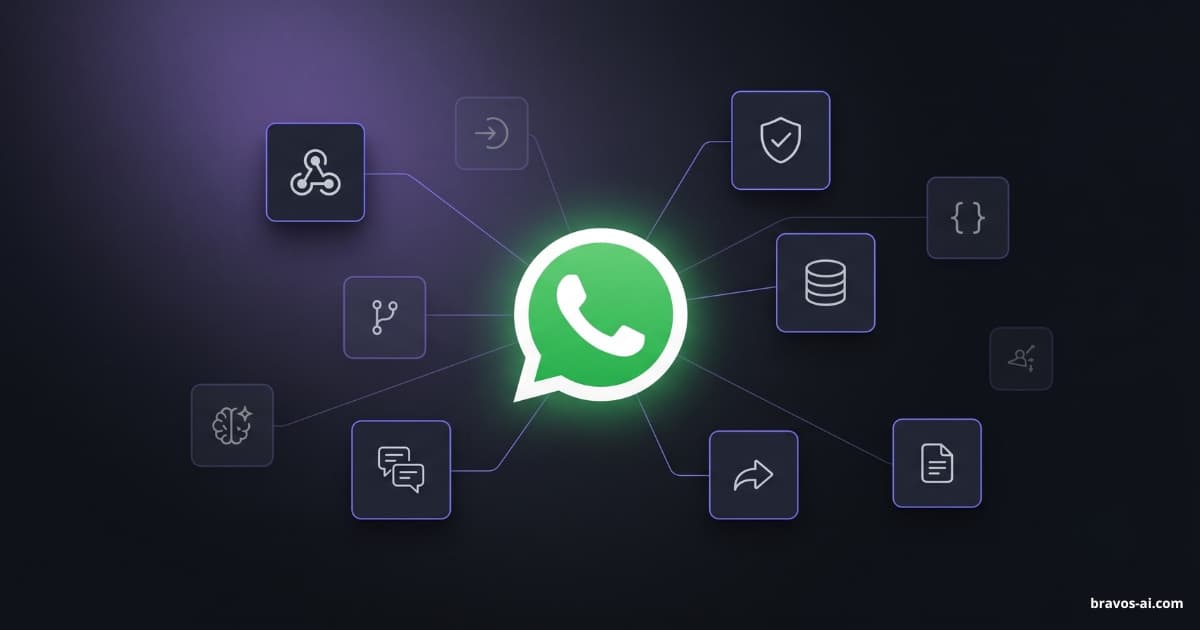
This is the full component list for a WhatsApp AI chatbot (or WhatsApp AI agent — the same thing) that answers with your business data. Whichever low-code platform you pick, all nine are required.
Receives the event when a message arrives at your WhatsApp Business number.
Initial hub_verify_token validation against Meta plus signature check on every request.
Extract the text, customer number, conversation id and message type from Meta's JSON.
Branching logic for text, image, audio, location, document or sticker. Each one is processed differently.
Where the OpenAI cost lives. If you want the bot to reply with your business data, block 6 is required.
Embeddings + vector DB + similarity. Without this, the bot only knows what you stuff in the system prompt. Unworkable for catalogs.
Persistence of chat history per WhatsApp number. Without this, every message is the first message.
POST to the Meta Cloud API with the access token. Error handling when the token expires or rate limits hit.
Knowing what happened when a customer reports the bot did not reply. Without this, you debug blind.
Public tutorials cover blocks 1 and 8 well. The other seven you build yourself. The ones that surprise people most:
Connecting to the WhatsApp Cloud API is not a toggle
Two clocks run in parallel here. The first is your technical work: four to eight hours the first time if you have never touched Meta for Developers. Create a Meta app, set up a WhatsApp Business Account, generate an access token, register the phone number, verify the webhook with a hub_verify_token, and stand up a public HTTPS endpoint. On self-hosted n8n, that endpoint means a real domain with valid SSL, not localhost.
The second clock is Meta's side, which you cannot speed up. When you create the app, Meta gives you a test phone number you can use the same day to receive and reply to messages (no card, no verification), capped at 250 messages every 24 hours and a small fixed allowlist of recipients. To move to your real business number with real volume, you go through Meta Business Verification: upload incorporation papers, tax ID, a utility bill, and wait 2 to 10 business days for approval. While you wait, the bot can already be answering on the test number if you accept that as a temporary setup.
The AI brain: system prompt alone is not enough
The system prompt is the set of instructions you give the AI model at the start of every conversation: who it is, what it does, and what information about your business it has on hand. It is the block most people underestimate. There are two paths:
- System prompt only. All business info stuffed inside the system prompt. Works for very basic Q&A (hours, address). Falls apart with product catalogs or long documents: the model cannot keep thousands of words of context on every call without blowing up cost and latency.
- RAG-based. Instead of stuffing everything in the system prompt, you store your content in a vector database (a type of database designed for searching by meaning, not by exact words; typical products: Pinecone, Supabase or Chroma). Before storing, each chunk of your content is converted into a numerical vector (those are the embeddings). On every customer question, the system retrieves the relevant chunks and only passes those to the model. This answers with your real content, but adds three external services to the list and tuning retrieval well takes real time.
The typical tutorial builds the bot with system prompt only. It looks fine in the demo, until a real customer asks about a specific product and the bot makes up the answer.
Conversation memory most builders forget
WhatsApp does not remember anything by itself: every inbound message runs your workflow from scratch. If a customer writes «do you have size 42?» after a previous message asking about shoes, the bot will not remember it was talking about shoes unless you store the history somewhere. On self-hosted n8n you do that with a separate database (Postgres or Redis are the usual picks). On Make or Zapier you need an external database hired separately (Airtable, Supabase, similar). Yet another piece the tutorial never mentions.
How much does a WhatsApp chatbot with n8n cost per month (line-by-line)
Assuming small-business volume (500 to 1,500 inbound messages per month), this is the real monthly cost once the bot is live:
| Component | n8n self-hosted | Make | Zapier |
|---|---|---|---|
| Low-code platform | $0 (license) | $10/mo Core | $19.99/mo Pro |
| VPS hosting (n8n) | $5-15/mo | — | — |
| Domain + SSL | $1-2/mo | — | — |
| OpenAI calls | $15-45/mo | $15-45/mo | $15-45/mo |
| Vector DB for RAG | $0 (pgvector) or $0-20/mo Pinecone | $0-20/mo Pinecone | $0-20/mo Pinecone |
| DB for conversation memory | included in VPS | $5-10/mo Supabase | $5-10/mo Supabase |
| Meta WhatsApp (within 24h window) | $0 | $0 | $0 |
| Approx. monthly total | $21-77 | $30-85 | $40-95 |
Ranges depend on real volume, the OpenAI model you pick (mini variants like gpt-4o-mini are cheap and fast; larger models like gpt-5.5 cost more but handle complex questions better), and whether you need a paid vector DB or you can survive on pgvector.
In dollars, self-hosted n8n is the cheapest path. Make and Zapier land close to the price of a managed platform at mid-tier without saving any of the build hours.
How long does it take to build a WhatsApp chatbot with n8n
What we have seen with developers who have prior REST API experience but no prior Meta or RAG work:
- Connecting to the WhatsApp Cloud API (app, webhook, token): 3-5 hours.
- Linear flow to receive and reply plain text with no AI: 1-2 hours (this is all the tutorial covers).
- OpenAI integration with system prompt only: 1-2 hours.
- Real RAG (upload content, vector database, retrieval tuning): 4-8 hours.
- Conversation memory with database persistence: 1-3 hours.
- Inbound media handling (transcribe audio with Whisper, read images with GPT-5.5 or Claude vision): 2-4 hours.
- Token renewal, monitoring, alerts: 1-2 hours.
- Total for a serious bot: 13-26 hours the first time. Without RAG, more like 8-15.
If you have never touched Meta for Developers or built a RAG before, multiply the ranges by 1.5 or 2. If you already know both, take 30% off.
Add the maintenance overhead: every time Meta changes the webhook (two or three times a year), you go in again. Every 60 days you renew the access token unless you have set up a System User token with persistent permissions, which is another documentation deep-dive.
WhatsApp Cloud API pitfalls no tutorial mentions
Tokens expire every 60 days
Unless you use a Meta System User token (which requires being a Meta-verified business or Tech Provider), the standard access token expires every 60 days. When it expires, the bot stops replying and you find out because a customer complains. You need to automate the renewal with a separate process. Another component on the diagram.
Inbound media is a separate download
When a customer sends a photo or audio over WhatsApp, Meta does not include the file in the webhook. It sends a media_id. To get the real file, your workflow needs to fire another WhatsApp Cloud API request, download the file, store it on your end, and only then pass it to the AI model. If you want the bot to understand audio, add Whisper (OpenAI's speech-to-text model). If you want it to understand images, add GPT-5.5 vision or Claude vision.
The 24-hour window exists regardless
Meta's rule about not initiating conversations outside the 24-hour window (unless via approved templates) applies the same way whether you build with n8n or pay for a managed platform. DIY does not free you from it. If your bot only replies (never initiates), it never affects you. If you want to send broadcast messages or follow-ups, you need to learn Meta's template system and its approval process.
Logs and debugging when something fails
Self-hosted n8n gives you per-workflow execution logs. Make has plan-limited operation history. Zapier's failed task debugging is sparse. When a customer reports you never replied, debugging without proper logs is debugging blind. Managed platforms give you this in the dashboard; on a DIY build you wire it yourself.
n8n vs Make vs Zapier for WhatsApp: which one fits your case
All three can connect to the WhatsApp Cloud API and power a WhatsApp AI agent or chatbot, but they differ in cost, onboarding effort and how much headroom they give you to grow:
| Aspect | n8n self-hosted | Make | Zapier |
|---|---|---|---|
| Base monthly cost | $6-17 (server included) | $10/mo Core | $19.99/mo Pro |
| Onboarding difficulty | High (server + domain + n8n) | Medium (account + modules) | Low (account and you are off) |
| Monthly operation/task cap | No cap (server is the limit) | 10,000 ops on Core | 750 tasks on Pro |
| Built-in AI? | No, you add OpenAI manually | No, you add OpenAI manually | No, you add OpenAI manually |
| Best for | Developer with own server and full control | Small business at medium volume without their own server | Quick tests or tiny volume |
In short: self-hosted n8n is the most flexible and cheapest long term, but you need to know how to run a server with HTTPS. Make is the reasonable middle ground if you do not have a server. Zapier ends up expensive because WhatsApp consumes tasks fast and almost always pushes you to a higher plan. If you plan to run multiple bots or your monthly volume goes over 1,500 messages, self-hosted n8n wins on cost every time. If you want to set it up in one afternoon without touching a server, Make is the fastest path.
When DIY actually makes sense
There are cases where DIY is the right call. These:
- Your internal system cannot push events when something changes. If your ERP or SAP system can only be read by direct query (you make a call and it answers, but it cannot notify anyone when an order changes state), building it yourself on n8n lets you make that call right at the moment of the message with an HTTP node inside the flow. At Bravos AI we have Custom Webhook and it runs in real time, but it works the other way around: your system needs to notify us when something changes. If your ERP can push, we cover you in real time; if it can only be queried, that is where DIY wins.
- Your volume is tiny and predictable. 50 messages a month, one conversation type. At that volume, paying a monthly subscription does not pay off.
- You want to learn how the WhatsApp Cloud API works under the hood. Legitimate reason. Just do not confuse it with a business case.
For everyone else — small business with real volume, owner who is not a developer, agency deploying for multiple clients — the math does not work. The headline price of Make or n8n does not offset 15 build hours or 2-4 monthly maintenance hours.
Closed alternative: WhatsApp AI chatbot ready in 60 seconds
At Bravos AI we take the nine components off your plate and bill them as a flat fee.
We are a verified Meta Tech Provider, so connecting your WhatsApp Business number is a 60-second popup where you log in with Facebook and pick the phone number. No Meta for Developers app to create, no Meta webhook to configure, no token to renew, no server to maintain. We handle the 9 components on the list, not you.
The bot pulls from the real catalog connected in the dashboard and shares a booking link with the product reference pre-filled.
The real catalog is connected once: upload a CSV or sync your Shopify or PrestaShop store. From that point on, the bot replies with real stock, real price and real availability, not invented ones. If it does not know, it says so. And if you have an ERP, an SAP system or an internal database, you get Custom Webhook: your system sends us data signed with a secret key and everything you sync becomes available to the bot. We cover this topic in depth in how to keep your chatbot up to date without Zapier or n8n. Want to add a PDF with return policies? Upload it and you are done.
Cost: $23/month Starter (WhatsApp and analytics included) or $59/month PRO if you need up to 3 bots or built-in lead-capture forms. Nothing extra from Meta as long as you reply within the 24-hour service window opened by each customer message — which is exactly what a reactive bot does. New accounts start with a 7-day PRO trial that lets you test everything, WhatsApp included, with no charge until day 7.
Sources
- Meta — WhatsApp Cloud API: webhooks — Official docs for the inbound webhook that receives messages. This is the first block you need to wire up in n8n, Make or Zapier
- Meta — WhatsApp Business Platform pricing 2025 — July 2025 change: replies sent within the 24-hour customer service window opened by each inbound message are free and uncapped. Applies to both DIY builds and managed platforms
- Meta — System User access tokens — Why standard tokens expire every 60 days and why verified Tech Providers (such as Bravos AI) use System User tokens that do not expire
- n8n — WhatsApp Trigger node docs — n8n documentation for connecting to the WhatsApp Business Cloud API. A good starting point for understanding the real scope of the node
- Make — WhatsApp Business Cloud modules — Official Make integration page listing all WhatsApp Cloud API modules: webhook trigger, send message, get media. The bare minimum to wire a basic flow
- Zapier — WhatsApp Business Triggers & Actions — Official Zapier integration with WhatsApp Business. Limited triggers and high task consumption at any real volume
FAQs
Can I build a WhatsApp AI chatbot with n8n?
Yes, technically. n8n has an official WhatsApp Business Cloud node that connects to the WhatsApp Cloud API. The node covers blocks 1 and 8 of the 9 (inbound webhook and outbound send). The other seven you build with extra nodes: the AI brain, conversation memory with persistence, inbound media handling, token renewal and logging. Viable if you have 13-26 hours and a server to host n8n with a proper HTTPS domain.
Is Make.com cheaper than a managed WhatsApp chatbot platform?
On the headline subscription, Make ($10/month Core) looks cheaper. Once you add the required extras (OpenAI calls, vector database for RAG, database for conversation memory), the real monthly cost lands at $30-85, very close to a managed platform that already bundles everything. And it does not cover the 13-26 build hours or the maintenance. Zapier usually ends up more expensive because WhatsApp consumes tasks quickly and forces you to a higher plan.
How long does it take to build a working WhatsApp AI bot from scratch with n8n?
For a developer with REST API experience but no prior Meta or RAG work: 13-26 hours for a serious bot with AI, RAG and memory. Without RAG (system prompt only), about 8-15 hours, but the result is notably weaker for product catalogs. For someone without prior technical experience, the timeline blows up because Meta for Developers has a steep learning curve.
Why does the WhatsApp token need renewing every 60 days?
Meta's standard user access token has a 60-day expiry by design. When it expires, every WhatsApp Cloud API call starts failing and the bot goes silent. To avoid it, configure a System User token (requires being a Meta-verified business) or schedule an automated task that renews the token before it expires. At Bravos AI, since we are a verified Tech Provider, we use a System User token at the platform level: the end customer never touches tokens.
Can I integrate ChatGPT with WhatsApp using n8n?
Yes. n8n has an official OpenAI node that calls the API and returns the model's response. You wire it to the WhatsApp Business Cloud node so the flow is: inbound message → OpenAI call with the customer context → reply back to WhatsApp. It works for one-off questions but, if you want the bot to answer with your real business data (catalog, prices, hours), you also need RAG: upload your content, generate embeddings, query them on every call. That is blocks 5 and 6 of the 9 this article details.
Bottom line
Building a WhatsApp AI chatbot with n8n, Make or Zapier is technically possible and, on raw subscription dollars, can look cheaper than a managed platform. But the nine components you have to build, the 13-26 hours it takes the first time, and the monthly maintenance on tokens, media files and logs turn the savings into something more nuanced than the headline suggests.
If you are a developer and need the bot to query an internal system in real time during the message, self-hosted n8n is a reasonable call. For everyone else, at Bravos AI we take most of the work off your plate: the 9 components come built-in, token renewal included, and if you have internal data you wire it via Custom Webhook. If you want to give us a try with everything included for 7 days, start here.
For more context, check our piece on how to build a WhatsApp AI chatbot in 2026 (the four real paths) or how to auto-reply on WhatsApp.
Want your WhatsApp chatbot live in 60 seconds instead of 15 hours?
Build your bot on Bravos AI, connect it to WhatsApp Business and let the AI answer with the real info from your business. Without building the 9 components from scratch.
Try PRO free for 7 days